

Direct payment
Direct payment integration
To perform a direct payment integration (with credit and/or debit card), that is, without being redirected to the OrkestaPay checkout, it is necessary to follow these steps:
- Service authentication
- Tokenize card
- Register order
- Register payment
1.- Service authentication
You must copy the API access credentials to call the OrkestaPay authentication service and obtain an access token that will be used to call the rest of the services.
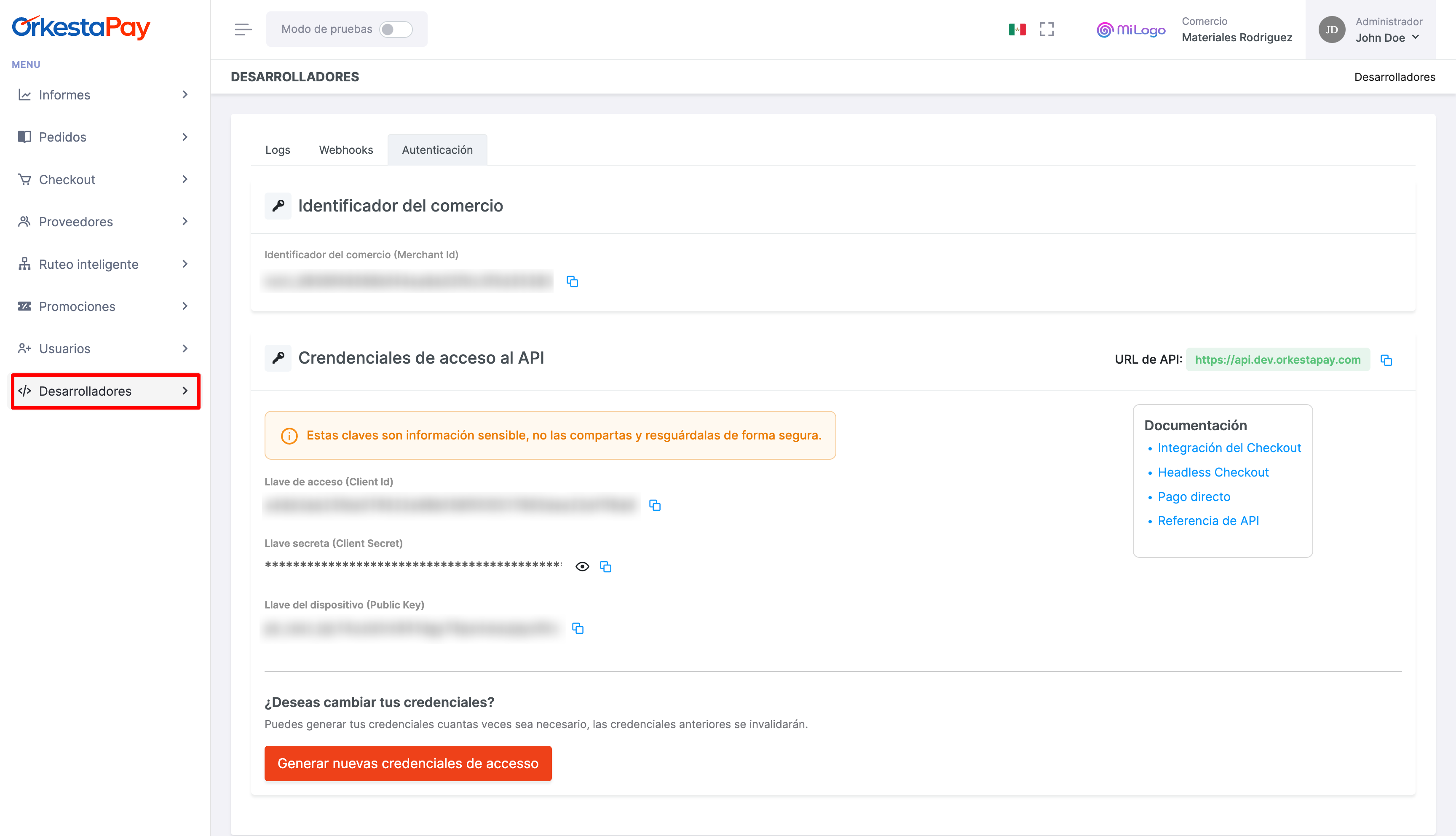
Request to the service
After copying the credentials, you must find the texts REPLACE_WITH_YOUR_CLIENT_ID and REPLACE_WITH_YOUR_CLIENT_SECRET in the script below and replace them with the copied values in order to execute the service call via shell:
client_id: Access keyclient_secret: Secret key
Permission type
The grant_type property must always carry the value client_credentials, since it is the operating model of the oAuth 2.0 protocol that OrkestaPay uses to authenticate services.
curl --request POST \
     --url https://api.sand.orkestapay.com/v1/oauth/tokens \
     --header 'Accept: application/json' \
     --header 'Content-Type: application/json' \
     --data '
{
     "client_id": "REPLACE_WITH_YOUR_CLIENT_ID",
     "client_secret": "REPLACE_WITH_YOUR_CLIENT_SECRET",
     "grant_type": "client_credentials"
}
'
DocumentationVisit our API documentation: https://docs-en.orkestapay.com/reference/get-access-token
Service response
As a result of the call to the authentication service, a JWT token will be returned, which will be used in all subsequent calls to the OrkestaPay API services.
{
  "token_type": "Bearer",
  "expires_in": 1800,
  "access_token": "eyJhbGciOiJSUzI1NiIsInR5cCIgOiAiSldUIiwia2lkIiA6ICIwenJMTnEwbzBab1R4NTlaeWVPaTI1RGxZLWl6cV91SVFSLThWS0RaWjlFIn0.eyJleHAiOjE2Njk4NTAzNTAsImlhdCI6MTY2OTg1MDE3MCwianRpIjoiMWI4MWZhMDItMzk2ZC00NGNjLWJlMzctZGU4ZWQyODg2MTEyIiwiaXNzIjoiaHR0cHM6Ly9kZXYtYXV0aC56ZW5raS5maS9hdXRoL3JlYWxtcy9wYnciLCJzdWIiOiIxMjgyNjJhOS00NDgxLTQ4OGItYTczNi1iNmI5MTA1NjQ4MzQiLCJ0eXAiOiJCZWFyZXIiLCJhenAiOiI1MDg3ODE3MDhjNzk5MTE5NTJkZGJlYWZkZjM5NjNmNTcxYjNjYzE4YzE5YmNkY2YiLCJhY3IiOiIxIiwiYWxsb3dlZC1vcmlnaW5zIjpbImh0dHBzOi8vcG9ydGFsLWRldi56ZW5raS5maSJdLCJyZWFsbV9hY2Nlc3MiOnsicm9sZXMiOlsiYXBpIiwiYXBpX3plbmtpcGF5Il19LCJzY29wZSI6InByb2ZpbGUgZW1haWwiLCJlbWFpbF92ZXJpZmllZCI6ZmFsc2UsImNsaWVudEhvc3QiOiIzNS44NS4yMy4xOTAiLCJjbGllbnRJZCI6IjUwODc4MTcwOGM3OTkxMTk1MmRkYmVhZmRmMzk2M2Y1NzFiM2NjMThjMTliY2RjZiIsInByZWZlcnJlZF91c2VybmFtZSI6InNlcnZpY2UtYWNjb3VudC01MDg3ODE3MDhjNzk5MTE5NTJkZGJlYWZkZjM5NjNmNTcxYjNjYzE4YzE5YmNkY2YiLCJjbGllbnRBZGRyZXNzIjoiMzUuODUuMjMuMTkwIn0.Ds5eQ-tkn4ckTUHI-mrJn6eYBaUa-6uZNxzrGRfYc5neI1TvB2RHu_IDsktDVi9XdR5P_P0mSpzar9jWJOrxxA_csTnn9ZXy8rDeRqjMm9j03xWz-tZcxiUM6xvN1qvOeBGFzISIP9y24jyL0Jqpl8YhkSGF8xBfFvfhOvEMvgLby5n7dTDoZVi2Bw8G1kZJKPejmBu8MJetl08OoVk_obp6lW3YetQPYTwsutOc_yIxBIUkPSH2Gj3wpBxBa8EfMES4J1SAT7Thpw_CmZ_PNB9rEDUJI4bzE7QM2Z0n4LNXzbo5JFuWudKwfhqOcryH0slmHOamJgbtR5EGryf8LQ"
}
DocumentationVisit our API documentation: https://docs-en.orkestapay.com/reference/get-access-token
2.- Tokenize card
For security reasons, it is necessary to tokenize the card from the web client, to prevent this information from traveling to the merchant's server. For this, it is necessary to use OrkestaPay's JavaScript library (https://resources.orkestapay.com/js/orkestapay.js).
It is also necessary to generate a device_session_id, which will serve as a fraud prevention mechanism, meaning it will help identify the devices from which payments are made.
Both pieces of data must be sent to the server to continue with the payment process.
To carry out the implementation, the credentials obtained from the OrkestaPay dashboard are required:
- Merchant ID
- Public key
Required resources:
<script
  src="https://resources.orkestapay.com/js/orkestapay.js"
  integrity="sha384-lQoLMYDY2Cz/Y+8BLiNbhfLVHWawqsA/gE/8WRTpF6ZS3EABNKXhrq/0bBu4M1aI"
  crossorigin="anonymous"
></script>
Example
Below is a basic example of the implementation:
<!DOCTYPE html>
<html lang="en">
  <head>
    <meta charset="UTF-8" />
    <meta name="viewport" content="width=device-width, initial-scale=1.0" />
    <title>Example 1</title>
    <link
      rel="stylesheet"
      href="https://cdn.jsdelivr.net/npm/[email protected]/dist/css/bootstrap.min.css"
      integrity="sha384-QWTKZyjpPEjISv5WaRU9OFeRpok6YctnYmDr5pNlyT2bRjXh0JMhjY6hW+ALEwIH"
      crossorigin="anonymous"
    />
  </head>
  <body>
    <main class="container">
      <form id="payment-form">
        <section class="row mt-5">
          <h1 id="card-title" class="col-12 text-center"></h1>
          <article class="pt-3 col-12 col-lg-4">
            <label for="card-number" class="form-label">Card number</label>
            <input type="text" id="card-number" class="form-control" autocomplete="cc-number" inputmode="numeric" name="cc-number" />
            <small id="card-number-error" class="text-danger"></small>
          </article>
          <article class="pt-3 col-6 col-lg-2">
            <label for="card-expiration" class="form-label">Expiration</label>
            <input type="text" id="card-expiration" class="form-control" placeholder="MM/YY" autocomplete="cc-exp" name="cc-exp" />
            <small id="card-expiration-error" class="text-danger"></small>
          </article>
          <article class="pt-3 col-6 col-lg-2">
            <label for="card-csc" class="form-label">CSC</label>
            <input type="text" id="card-csc" class="form-control" autocomplete="cc-csc" inputmode="numeric" name="cc-csc" />
            <small id="card-csc-error" class="text-danger"></small>
          </article>
          <article class="pt-3 col-12 col-lg-4">
            <label for="card-promotions" class="form-label">Promotions</label>
            <select name="card-promotions" id="card-promotions" class="form-select"></select>
          </article>
          <article class="pt-3 col-12 col-lg-4">
            <label for="card-holder-name" class="form-label">Holder name</label>
            <input type="text" id="card-holder-name" class="form-control" autocomplete="cc-given-name" name="cc-given-name" />
            <small id="card-holder-name-error" class="text-danger"></small>
          </article>
          <article class="pt-3 col-12 col-lg-4">
            <label for="card-holder-last-name" class="form-label"> Holder last name </label>
            <input type="text" id="card-holder-last-name" class="form-control" autocomplete="cc-additional-name" name="cc-additional-name" />
            <small id="card-holder-last-name-error" class="text-danger"></small>
          </article>
          <article class="pt-3 col-12 col-lg-4 d-flex justify-content-end align-items-end">
            <button type="button" id="btn-create-payment-method" class="btn btn-primary">Create payment method</button>
          </article>
          <article class="pt-3 col-12">
            <div id="payment-method-details" class="w-100 alert" role="alert"></div>
          </article>
        </section>
      </form>
    </main>
    <script
      src="https://resources.orkestapay.com/js/orkestapay.js"
      integrity="sha384-lQoLMYDY2Cz/Y+8BLiNbhfLVHWawqsA/gE/8WRTpF6ZS3EABNKXhrq/0bBu4M1aI"
      crossorigin="anonymous"
    ></script>
    <script type="text/javascript">
      const currency = "MXN";
      const total_amount = "100.00";

      const card_number_id = "card-number";
      const expiration_date_id = "card-expiration";
      const verification_code_id = "card-csc";
      const holder_name_id = "card-holder-name";
      const holder_last_name_id = "card-holder-last-name";

      (async function main() {
        initTitle();
        const orkestapay = createOrkestaPay();
        const orkestapay_card = await createOrkestaPayCard(orkestapay);
        getDeviceSessionId(orkestapay);
        handleButtonClickEvent(orkestapay_card);
        handlePromotionChanges(orkestapay_card);
        handleErrorEventChanges(orkestapay_card);
      })();

      function initTitle() {
        const card_title_id = "card-title";
        const card_title = document.getElementById(card_title_id);
        card_title.textContent = `Create a payment method with ${currency} $${total_amount}`;
      }

      function createOrkestaPay() {
        const is_sandbox = true;
        const merchant_id = "{YOUR_MERCHANT_ID}";
        const public_key = "{YOUR_PUBLIC_KEY_OR_DEVICE_KEY}";
        return initOrkestaPay({
          is_sandbox,
          merchant_id,
          public_key,
        });
      }

      function createOrkestaPayCard(orkestapay) {
        const card_number = document.getElementById(card_number_id);
        const expiration_date = document.getElementById(expiration_date_id);
        const verification_code = document.getElementById(verification_code_id);
        const holder_name = document.getElementById(holder_name_id);
        const holder_last_name = document.getElementById(holder_last_name_id);

        const promotions_params = { currency, total_amount };
        return orkestapay.createCard({
          card_number,
          expiration_date,
          verification_code,
          holder_name,
          holder_last_name,
          promotions_params,
        });
      }

      function handleButtonClickEvent(orkestapay_card) {
        const btn_create_payment_method_id = "btn-create-payment-method";
        const btn_create_payment_method = document.getElementById(btn_create_payment_method_id);
        btn_create_payment_method.addEventListener("click", async () => {
          await createPaymentMethod(orkestapay_card);
        });
      }

      async function createPaymentMethod(orkestapay_card) {
        const payment_method_details_id = "payment-method-details";
        const payment_method_details = document.getElementById(payment_method_details_id);

        try {
          const one_time_use = true;
          const payment_method = await orkestapay_card.createToken({
            one_time_use,
          });
          payment_method_details.classList.remove("alert-danger");
          payment_method_details.classList.add("alert-success");
          payment_method_details.textContent = JSON.stringify(payment_method, null, 2);
        } catch (error) {
          payment_method_details.classList.remove("alert-success");
          payment_method_details.classList.add("alert-danger");
          payment_method_details.textContent = parseError2String(error);
          logError(createPaymentMethod.name, orkestapay_card.createToken.name, error);
        }
      }

      function handlePromotionChanges(orkestapay_card) {
        const card_promotions_id = "card-promotions";
        const card_promotions = document.getElementById(card_promotions_id);

        orkestapay_card.card_number.promotions$.subscribe((promotions) => {
          card_promotions.replaceChildren();

          const option = document.createElement("option");
          option.value = null;
          option.textContent = "Select promotion";
          card_promotions.appendChild(option);

          for (const type of promotions) {
            for (const promotion of type.installments) {
              const option = document.createElement("option");
              option.value = promotion;
              option.textContent = `${promotion} ${type.type}`;
              card_promotions.appendChild(option);
            }
          }
        });
      }

      function getDeviceSessionId(orkestapay) {
        orkestapay
          .getDeviceInfo()
          .then((data) => {
            const device_session_input = document.createElement("input");
            device_session_input.type = "hidden";
            device_session_input.value = data.device_session_id;
            device_session_input.name = "device_session_id";

            const container = document.getElementById("payment-form");
            container.appendChild(device_session_input);
          })
          .catch((err) => console.error(err));
      }

      function handleErrorEventChanges(orkestapay_card) {
        const card_number_error_id = `${card_number_id}-error`;
        const expiration_date_error_id = `${expiration_date_id}-error`;
        const verification_code_error_id = `${verification_code_id}-error`;
        const holder_name_error_id = `${holder_name_id}-error`;
        const holder_last_name_error_id = `${holder_last_name_id}-error`;

        const card_number_error = document.getElementById(card_number_error_id);
        const expiration_date_error = document.getElementById(expiration_date_error_id);
        const verification_code_error = document.getElementById(verification_code_error_id);
        const holder_name_error = document.getElementById(holder_name_error_id);
        const holder_last_name_error = document.getElementById(holder_last_name_error_id);

        orkestapay_card.card_number.errors$.subscribe((error) => {
          card_number_error.textContent = parseError2String(error);
          logError(handleErrorEventChanges.name, card_number_id, error);
        });

        orkestapay_card.expiration_date.errors$.subscribe((error) => {
          expiration_date_error.textContent = parseError2String(error);
          logError(handleErrorEventChanges.name, expiration_date_id, error);
        });

        orkestapay_card.verification_code.errors$.subscribe((error) => {
          verification_code_error.textContent = parseError2String(error);
          logError(handleErrorEventChanges.name, verification_code_id, error);
        });

        orkestapay_card.holder_name.errors$.subscribe((error) => {
          holder_name_error.textContent = parseError2String(error);
          logError(handleErrorEventChanges.name, holder_name_id, error);
        });

        orkestapay_card.holder_last_name.errors$.subscribe((error) => {
          holder_last_name_error.textContent = parseError2String(error);
          logError(handleErrorEventChanges.name, holder_last_name_id, error);
        });
      }

      function parseError2String(error) {
        return error?.message ?? "";
      }

      function logError(origin, name, error) {
        error && console.error(origin, name, error.code, error);
      }
    </script>
  </body>
</html>
2.1.- Generate Device Session ID
As mentioned in the previous point, it is necessary to generate a device_session_id, which will serve as a fraud prevention mechanism, meaning it will help identify the devices from which payments are made.
This value is required when calling the payment registration service, meaning it will need to be sent to the server along with the card token.
While the example described above includes it in a complete form, here we will detail it further.
- Initialize the Orkestapay instance with the credentials.
- Call the
getDeviceInfo()function which resolves a promise with thedevice_session_id. - Store the returned value in an input within the form that will send the data to the server. This value can also be assigned to some state in the application, depending on the frontend technology you are using.
const orkestapay = initOrkestaPay({ merchant_id, public_key, is_sandbox });

getDeviceSessionId(orkestapay);

function getDeviceSessionId(orkestapay) {
  orkestapay
    .getDeviceInfo()
    .then((data) => {
      const device_session_input = document.createElement("input");
      device_session_input.type = "hidden";
      device_session_input.value = data.device_session_id;
      device_session_input.name = "device_session_id";

      const container = document.getElementById("payment-form");
      container.appendChild(device_session_input);
    })
    .catch((err) => console.error(err));
}
3.- Register order
In this step, the items and amounts for which the customer is being charged are detailed — essentially the purchase checkout.
Request to the service
The "create order" service must be called, and as part of the request, the order ID (ORDER_ID) must be sent as a path parameter.
curl --request POST \
     --url https://api.sand.orkestapay.com/v1/orders \
     --header 'Accept: application/json' \
     --header 'Content-Type: application/json' \
     --header 'Authorization: Bearer REPLACE_WITH_YOUR_ACCESS_TOKEN' \
     --data '
{
    "merchant_order_id": "1366656595193",
    "currency": "MXN",
    "subtotal_amount": 1000,
    "country_code": "MX",
    "discounts": [
        {
            "amount": 10
        }
    ],
    "total_amount": 990,
    "products": [
        {
            "id": "7197",
            "name": "Pantalla TCL Smart TV Serie A3 A343 HD Android TV 40",
            "quantity": 1,
            "unit_price": 1000
        }
    ],
    "customer": {
        "first_name": "John",
        "last_name": "Doe",
        "email": "[email protected]"
    }
}
'
DocumentationVisit our API documentation: https://docs-en.orkestapay.com/reference/create-order
Service response
When registering the order, the following information will be returned. For now, only the order_id will be of interest, which we will need to complete the payment in the next and final step.
{
  "order_id": "ord_a73c91e6f6f949a3a39c9557f353d308",
  "status": "CREATED",
  "expires_at": "1713566914212",
  "merchant_order_id": "1366656595193",
  "country": "México",
  "country_code": "MX",
  "currency": "MXN",
  "taxes": [],
  "discounts": [
    {
      "amount": 10
    }
  ],
  "subtotal_amount": 1000,
  "total_amount": 990,
  "products": [
    {
      "product_id": "7197",
      "quantity": 1,
      "unit_price": 1000,
      "name": "Pantalla TCL Smart TV Serie A3 A343 HD Android TV 40"
    }
  ],
  "customer": {
    "customer_id": "cus_414bae1120844159bf10f1d6c7b30d74",
    "first_name": "John",
    "last_name": "Doe",
    "email": "[email protected]",
    "created_at": "1713480514197",
    "updated_at": "1713480514197"
  },
  "placed_at": "1713480514267",
  "metadata": {}
}
DocumentationVisit our API documentation: https://docs-en.orkestapay.com/reference/create-order
4.- Register payment
The last step is to register the payment with the information obtained in the previous steps.
Request to the service
The "create payment" service must be called, and as part of the request, the card token (payment_method_id) and the device_session_id obtained in step 1 and generated from the web client must be sent. Additionally, the Idempotency-Key header must be sent with a unique value for each new payment request.
curl --request POST \
     --url https://api.sand.orkestapay.com/v1/payments \
     --header 'Accept: application/json' \
     --header 'Content-Type: application/json' \
     --header 'Idempotency-Key: adffaf7a3141474555d988fbb5e43e85' \
     --header 'Authorization: Bearer REPLACE_WITH_YOUR_ACCESS_TOKEN' \
     --data '
{
   "payment_source": {
        "type" : "CARD",
        "payment_method_id": "{{REPLACE_WITH_CARD_TOKEN}}",
        "settings": {
            "card": {
                "capture":true
            }
        }
    },
    "device_session_id": "{{REPLACE_WITH_DEVICE_SESSION_ID}}",
    "order_id": "{{REPLACE_WITH_ORDER_ID}}"
}
'
DocumentationVisit our API documentation: https://docs-en.orkestapay.com/reference/create-payment
Service response
When registering the payment, the following information will be returned. If the payment was successful, the status will be COMPLETED.
{
  "payment_id": "pay_99a7678b55ac437394817d823c888573",
  "order_id": "ord_a73c91e6f6f949a3a39c9557f353d308",
  "status": "COMPLETED",
  "payment_source": {
    "type": "CARD",
    "settings": {
      "card": {
        "capture": true
      }
    },
    "payment_method_id": "pym_3863efa7d67d49099cdfeb7a0746b8d5"
  },
  "amount": {
    "captured": 990,
    "currency": "MXN"
  },
  "transactions": [
    {
      "type": "PURCHASE",
      "transaction_id": "ctx_4657f781dbbd4b3ca59a7fcf4db93ebe",
      "status": "SUCCESS",
      "amount": 990,
      "code": "APPROVED",
      "message": "Approved or completed successfully",
      "description": "Shopping World",
      "provider": {
        "merchant_provider_id": "mpv_4b324c00f62f41b39d4e8d3f0415e39b",
        "name": "Stripe",
        "provider_transaction_id": "ctx_4657f781dbbd4b3ca59a7fcf4db93ebe",
        "message": "Transaction approved",
        "code": ""
      },
      "authorization_code": "pi_3P6azvGYqhDa3Ul61yfIB9ih",
      "created_at": "1713369973147"
    }
  ],
  "created_at": "1713369969765",
  "updated_at": "1713369969765"
}
API DocumentationVisit our API documentation: https://docs-en.orkestapay.com/reference/create-payment
NOTE: It is recommended that during the flow you save the IDs or data you consider relevant for your integration.
Updated 3 months ago